Record everything
on your screen.
Show no one but you.
The iPhone screen recorder that finally respects you. Unlimited recordings, no watermark, no ads, no account — and every clip stays on your phone. Then turn it into content with a little studio in your pocket.
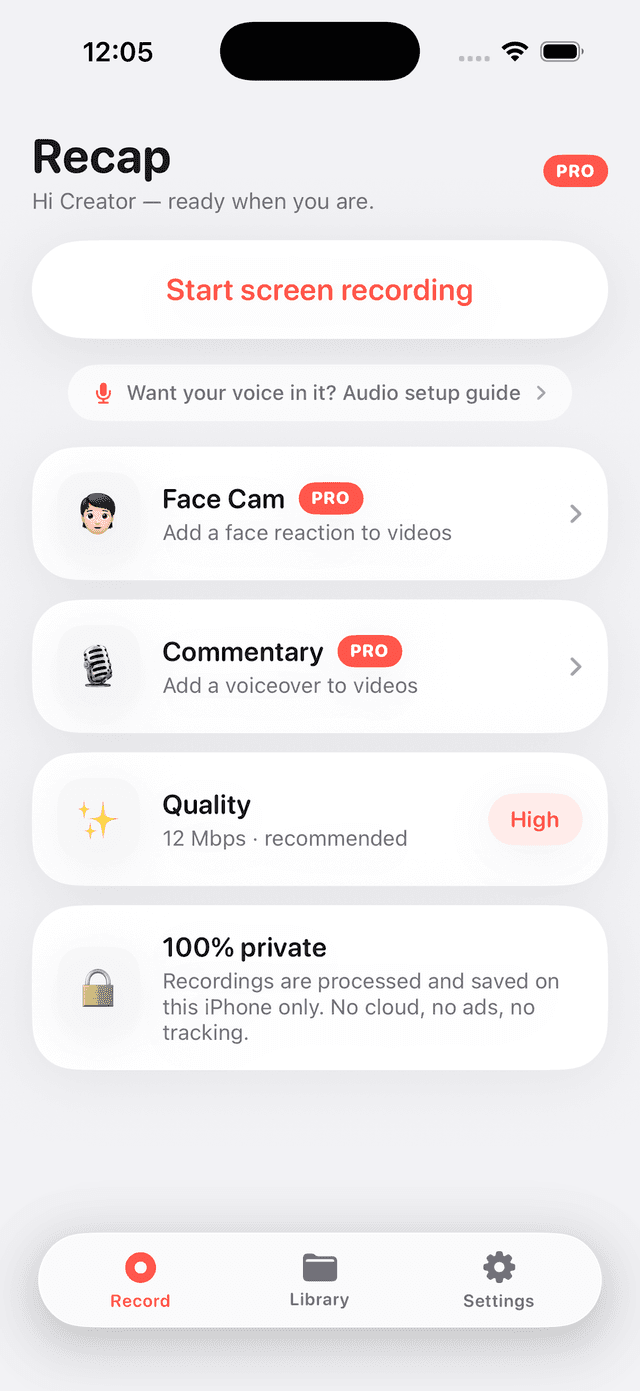
Every app. Every game.
No limits.
Recap captures your whole screen through Apple's system recorder — tutorials, gameplay, app demos, walkthroughs. There's no time cap, no watermark stamped on your video, and no "one free recording" trap. Add live mic commentary as you go.
- ✓Kill-safe recording — a dead battery or a call never wipes your clip
- ✓True-pitch audio, so your voice never comes out chipmunked
- ✓Correct rotation, every time — no more sideways videos
- ✓An honest Audio Guide that explains what iOS will and won't capture
Turn recordings into content.
Everything below runs entirely on your iPhone, with live progress and no uploads.
Reaction Cam
Play any recording while the front camera films you, then Recap composites a picture-in-picture reaction bubble over the video.
RECAP PROVoiceover
Narrate over a clip after the fact. Recap ducks the original audio under your voice and mixes a clean new track.
RECAP PROTrim editor
Cut the boring parts in seconds. Passthrough export means no re-encoding — a one-hour clip trims almost instantly.
RECAP PROUltra quality
Capture at 24 Mbps with HEVC for maximum detail on high-motion gameplay and crisp text in tutorials.
RECAP PROFind any clip in seconds.
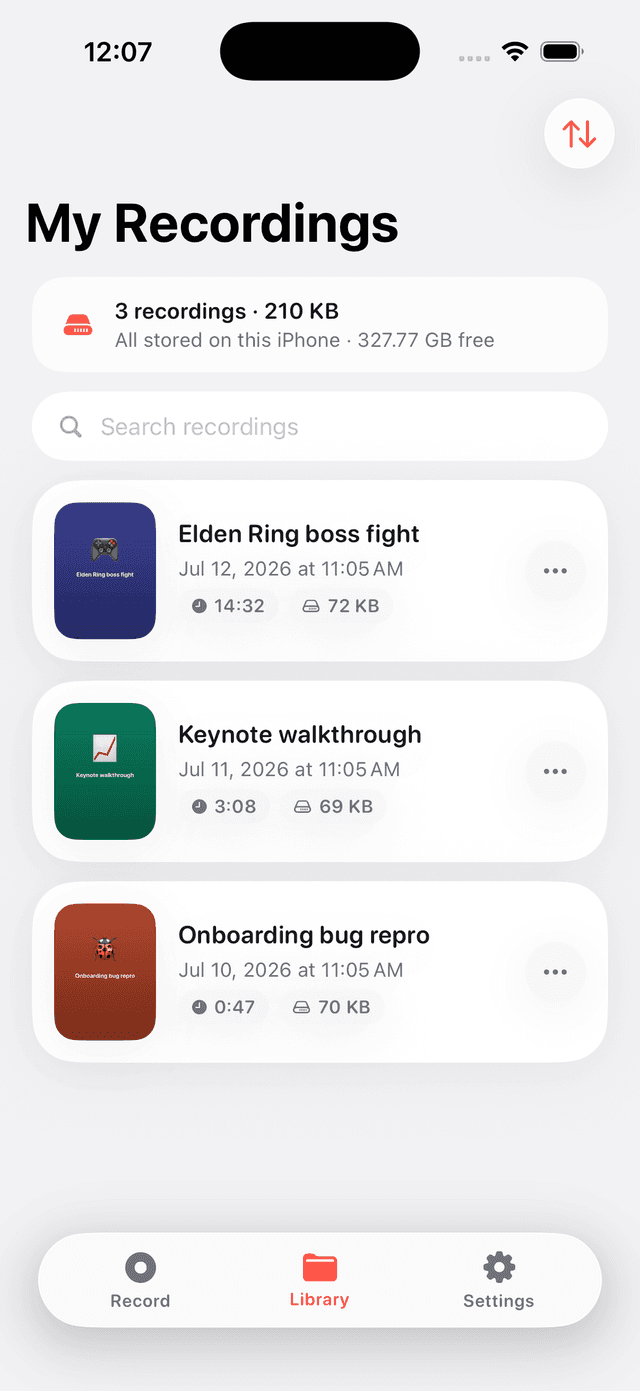
Recordings land in a library that's actually organized — sorted newest-first, with search, rename, and the length, size, and resolution of every clip right on the card. Nothing is ever auto-deleted, and a storage meter keeps you honest.
- ✓Sort by date, length, size, or name
- ✓Search & rename — no more "Recording 47"
- ✓One-tap Share, Save to Photos, or Save to Files
We read what people hated about the other screen recorders. Then we fixed all of it.
“You have to pay to even record.”
Recording is free forever — unlimited, no watermark. Pro only adds the studio tools.
“My 20-minute recording just disappeared.”
Fragmented, kill-safe writing means a crash or dead battery loses seconds, not everything.
“No audio” / “my voice sounds deep.”
Audio is encoded at its true sample rate, and an Audio Guide explains exactly what iOS captures.
“Can’t find my recordings.”
A sortable, searchable, renameable library with size and length on every card.
“Ads everywhere.”
Zero ads. No analytics SDK. No account. The app works fully offline.
“Paid, then no way to restore.”
Restore Purchases on the paywall and in Settings, with a Manage Subscription link.
Recap has no backend. On purpose.
Recording, editing, and storage all happen on your iPhone. Nothing is uploaded, no analytics watch you, and there's no account to create. Your recordings never leave your device — the only way they go anywhere is if you share them.
Recording is free. Forever.
No paywall on the thing you came for. Pro is there when you want the studio.
- ✓Unlimited screen recording
- ✓No time limits, no watermark
- ✓Live mic commentary
- ✓Full library: sort, search, rename
- ✓Share & save to Photos
- ✓Everything in Free, plus:
- ✓Reaction Cam — face over any recording
- ✓Voiceover commentary with ducking
- ✓Trim editor — instant, no re-encode
- ✓Ultra 24 Mbps + HEVC capture
Good to know
Is recording really free?+
Yes. Unlimited recordings, unlimited length, no watermark, and no ads — with or without Pro. Recap Pro only unlocks the editing studio (Reaction Cam, Voiceover, Trim, Ultra quality).
Can it record FaceTime or phone call audio?+
No app can. iOS itself blocks the capture of call audio for privacy — it's a system protection, not a Recap limitation. Recap's Audio Guide explains this honestly and shows how to record your own commentary instead.
Where are my recordings stored?+
Only on your iPhone. Recap has no server and no account. Nothing is uploaded. You can export any recording to Photos or Files whenever you want.
Do I need an account?+
No. Sign in with Apple is optional — it just keeps your name on your work and your Pro access across reinstalls. Everything works signed-out.
How do I cancel Pro?+
Anytime, in Settings → your Apple Account → Subscriptions. There's also a Manage link inside the app.

Hit record. Keep it all.
Keep it yours.
Native iOS. Liquid-glass design. Zero compromise on privacy.